A Little Help for PCC Treasurers
14/03/2025; 804 words; 4 minutes to read.
As you may have read from my About page, I am the Treasurer of All Saints’ Church, Mattersey, Parochial Church Council (PCC). You may also have seen this post about using MyNetWorth for managing PCC accounts. Up until now, users of MyNetWorth have had to design and build their own Accounts Trees, which is not a trivial undertaking. I run my own PCC’s accounts, using MyNetWorth, and I have recently rebuilt my Accounts Tree to align it closely with the Church of England Financial Return.
If you are a PCC Treasurer, who is looking for an accounts manager application to support you in running your PCC’s accounts and you are considering using MyNetWorth or iNetWorth, I believe that I could make your life a great deal easier by sharing the Accounts Tree that I have developed for running my own PCC’s accounts with you:
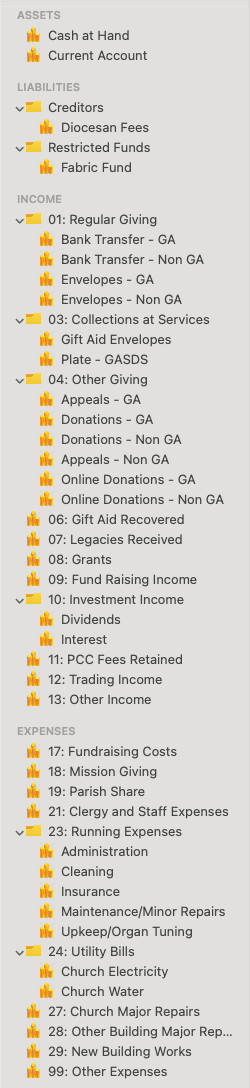
If you purchase MyNetWorth or MyNetWorth for Windows, you can import the PCC Accounts Tree by selecting the PCC Accounts Tree submenu item of the New Transaction File menu item in the File Menu of MyNetWorth or MyNetWorth for Windows. If you purchase iNetWorth, you can import the PCC Accounts Tree in the Edit Accounts View after creating a new Transactions File. Please see the Get Started pages of the User Guides on the Support Page for more information. You will then have a set of Accounts that you can use to complete your annual Financial Return with ease by generating the appropriate entries for the Return’s various fields in MyNetWorth’s Reports View (or in iNetWorth’s bespoke report, which can be generated in iNetWorth’s More View).
Once you have opened a new Transactions File with PCC Accounts Tree dataset selected, Save it and then add your payees, transactions and scheduled transactions. To generate reports containing the values that you need to complete your Financial Return, open MyNetWorth’s Reports View and select the appropriate Account Group (or Account), Start Date and End Date filters. Remember also that you can use MyNetWorth‘s Archive function to separate your PCC’s accounts over a lifetime into a set of datafiles, each referring to a particular year, which is something that I do; if you do this, you will not need to set Start Date and End Date filters to generate reports containing annual Financial Return entries.
As you will see, I have pre-populated some of Account Groups that are mapped to the Financial Return’s form fields with subaccounts, which you are likely to want to use for tracking income and expenses to the level needed to keep you and your own PCC members informed on where your PCC’s funds are coming from and going to. However, you are free, of course, to edit the Accounts Tree’s Account Groups and its Accounts to meet your own particular needs, using the Account Editing Buttons above the sidebar in MyNetWorth’s Accounts View (or the Edit Accounts Source View in iNetWorth).
Being a PCC Treasurer is not a trivial task (as I know very well!); however, I hope that the combination of MyNetWorth and the Account Trees provided at the links above may make that task a little easier. Please do recall that MyNetWorth is great value; the charge made for MyNetWorth (and for iNetWorth and the NetWorth Bundle) is a lifetime one-off - there are no subscription charges or in-App Purchases. Furthermore, any profits made (after paying for Apple and Microsoft’s Developer Fees and the hosting costs for this website) go to charity (i.e. meeting our Parish Share).
Created with Ignite
© 2022 - 2026 Christopher Hull. All rights reserved.